
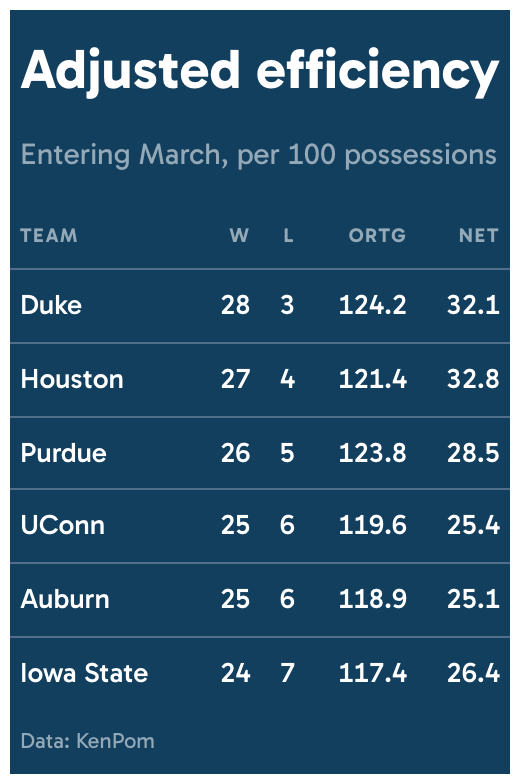
Colors the entire table surface instead of putting a colored detail on a neutral background, tying the table to a single brand or publication color.
Usage
gt_theme_drench(
  gt_object,
  color = "#123F5E",
  density = c("comfortable", "compact", "social"),
  ...
)
Arguments
- gt_object
A
gttable object to modify.- color
Character. The hex color the table is drenched in. Anything from a near-black to a mid-saturation brand color works, and very pale colors flip the type to dark automatically. Defaults to
"#123F5E".- density
Character. The type and padding scale. One of
"comfortable","compact", or"social". See Density. Defaults to"comfortable".- ...
Additional arguments passed to
gt::tab_options, applied last so they override anything the theme sets.
Details
Text, rules, and secondary type are all derived from color. The type color is
whichever of black or white measures higher contrast against the background,
and the rules are built by shifting the background itself, since gray laid over
a saturated ground looks washed out.
Legibility
The secondary color used for column labels, the subtitle and source notes is
blended toward the type color until it clears a 4.5:1 contrast ratio against
the background, so it stays readable whatever color you pass.
Density
density sets the type and padding scale together. "comfortable" uses a
14px body with roomy rows, "compact" a 12px body with tight rows, and
"social" a 17px body with generous rows and a larger title, at the scale
gt_save_crop() and gt_social_crop() export at.
See also
gt_theme_midnight() for a restrained dark background instead.